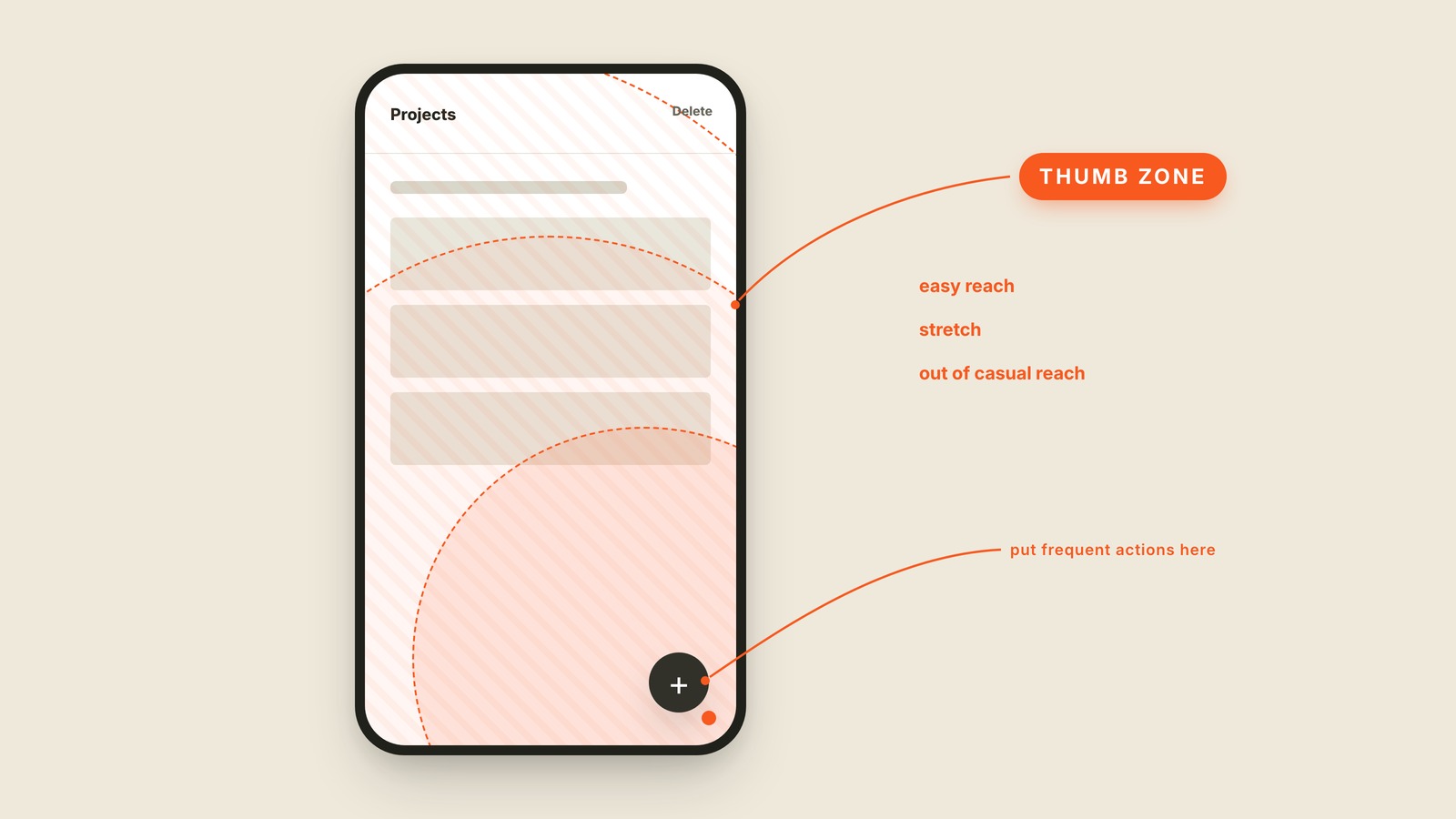
Fig. 15 / Thumb Zone
Mobile UI Patterns
Thumb Zone
EXPLAINED SIMPLY:The part of a phone one hand can reach comfortably.
The thumb zone is the part of a phone screen your thumb can reach comfortably while you hold the phone in one hand.
The easy area sits near the bottom corner where the thumb pivots. Reaching the opposite top edge means stretching, shifting your grip, or bringing in the other hand. A phone screen may be visible from corner to corner, but it is not equally reachable from corner to corner.
That is why a tab bar lives at the bottom and a floating action button often hovers nearby. Frequent actions belong where a thumb can find them without gymnastics. A destructive action can safely live farther away, where an accidental brush is less likely to reach it.
You'll also hear thumb reach, reachability, one-handed use, and reach zone. The exact shape changes with hand size, phone size, and which hand is holding it, so the diagram is a useful guide rather than a law. Design for the common reach, then test the real screen in a real hand.
Large phones made this problem impossible to ignore. If the main action requires a grip change every time, it is sitting in the wrong zone.